Showing posts with label learn linq. Show all posts

Sunday, 18 August 2013

First and Last Method in LINQ

Written By:-Isha Malhotra 
Our Website:-www.techaltum.com    

First and Last in LINQ

Use of First in LINQ

First method in LINQ just select the top 1 value from the data source.

For Example:-

First with array

int[] marks = new int[] { 23, 45, 78, 45, 56, 89, 56, 32 };

       int first = marks.First();

       Response.Write("First Element " + first);
Ouput


We can also pass condition while calling first method

Thursday, 25 July 2013

Jagged array using LINQ

Written By:-Isha Malhotra 
Our Website:-www.techaltum.com                                         
Jagged array using LINQ


We can also traverse jagged array using LINQ.

Following is the jagged array:-

int[][] jarray =new int[3][];
        jarray[0] = new int[3] { 4, 5, 6 };
        jarray[1] = new int[2] { 7, 8 };
        jarray[2] = new int[4] { 9, 10, 34, 12 };

Suppose I have to show all even elements then we will
Traverse the jagged array using LINQ in following manner:-

int[][] jarray =new int[3][];
        jarray[0] = new int[3] { 4, 5, 6 };
        jarray[1] = new int[2] { 7, 8 };
        jarray[2] = new int[4] { 9, 10, 34, 12 };

        IEnumerable<int> res = from jar in jarray
                               from res_jar in jar
                               where res_jar % 2 == 0
                               select res_jar;

        foreach (int res_data in res)
        {

            Response.Write(res_data);
       
        }

Saturday, 13 July 2013

Use of long count in LINQ

Written By:-Isha Malhotra 
Our Website:-www.techaltum.com
Use of long count in LINQ

Long count is similar to count as it works same but the only difference between them is that long count returns a 64 bit integer.

For Example:-

int[] marks = new int[] { 23, 45, 78, 90, 56, 89, 10, 32 };

      Int64 res = marks.LongCount(x => x % 2 == 0);
                        OR
long res_long = marks.LongCount(x => x % 2 == 0);
       Response.Write(res_long);

The output of this code will be 5.

Saturday, 29 June 2013

LINQ Hour 5-3 Skip/SkipWhile and Take/TakeWhile in LINQ

Written By:-Isha Malhotra 
Our Website:-www.techaltum.com
Skip/SkipWhile and Take/TakeWhile
Skip

Skip in LINQ is used to skip values from the beginning. We pass a numeric value to skip which represent that how many values we need to skip.

For example

Skip with array

int[] marks = new int[] { 23, 45, 78, 90, 56, 89, 10, 32 };

        var data_skip = (from res_skip in marks
                         orderby res_skip
                         select res_skip).Skip(3);
        Response.Write("Result using skip and skip count is 3 <br/>");
        foreach (int res_data_skip in data_skip)
        {
       
            Response.Write(res_data_skip+" ");
       
        }
Output


Figure 1

It simple arrange in ascending order and then skip 3 records as we gave 3 as input in the skip.

Friday, 14 June 2013

LINQ Hour 5-2 Sorting in LINQ

Written By:-Isha Malhotra 
Our Website:-www.techaltum.com
Sorting in LINQ

To sort data in LINQ we use orderby in the following manner:-

Sorting with Array

int[] marks = new int[] { 23, 45, 78, 90, 56, 89, 10, 32 };

        // it will sort in ascending order
        var sort_asc = from res_asc in marks
                       orderby res_asc
                       select res_asc;

        //it will sort in descending order
        var sort_desc = from res_desc in marks
                        orderby res_desc descending
                        select res_desc;

        Response.Write("Ascending order result <br/>");
        foreach (int res_asc in sort_asc)
        {

            Response.Write(res_asc + " ");
       
        }


        Response.Write("<br/>descending order result <br/>");
        foreach (int res_desc in sort_desc)
        {

            Response.Write(res_desc + " ");

        }

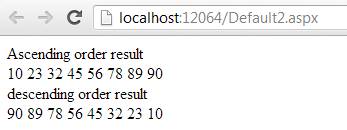
The output of the code is as follows:-


Figure 1

LINQ Hour 5 -1 Aggregate function in LINQ

Written By:-Isha Malhotra 
Our Website:-www.techaltum.com
Aggregate function using LINQ

We use many aggregate functions like sum, count, average, min, and max. In LINQ we can use this function in the following manner:-

SUM

If we want to perform sum aggregate function then we will implement the following queries:-

Sum with array

int[] marks = new int[] { 23, 45, 78, 90, 56, 89, 10, 32 };

        //simple sum without condition

        int res = marks.Sum();

        //sum with condition
        int res_with_where = marks.Where(cond => cond > 50).Sum();


        Response.Write("Sum without condition= " + res + "<br/>");

        Response.Write("Sum with condition="+ res_with_where+"<br/>");

Output of this code as follows:-


Figure 1

LINQ Hour 5 - Queries using LINQ

Written By:-Isha Malhotra 

Our Website:-www.techaltum.com
Perform different functionality (QUERY) using LINQ

As in the previous article I already discussed about select, insert, update and delete. I also discussed with where clause, order by, grouping. In this hour I will discuss about different operation which we can perform using LINQ. As we know we can perform this functionality on array, generics, database, xml etc. so here I am taking the example of array, generics and database. I will discuss xml separately.  

To work with this functionality I am taking the following source:-
Array

Using following int array:-

int[] marks = new int[] { 23, 45, 78, 90, 56, 89, 10, 32 };

Generics:-

Using following class to implement generics:-

public class data
{
    public int roll_no;
    public string student;
    public int per;

}

And following list:-

List<data> dt = new List<data>()
        {
            new data{roll_no=1, student="isha", per=100},
            new data{roll_no=2, student="neha", per=89},
            new data{roll_no=3, student="rahul", per=34}
        };
Database

Using following table:-


Figure 1

And create its class to mapping this table which is as follows:-

[Table(Name="prod_rep")]

public class Class1
{
   
    [Column]
    public int id;
    [Column]
    public int prod_year;
    [Column]
    public string dept;
    [Column]
    public int no_of_prod;
}

click on the following link to perform different functionality:-

Part 1 Aggregate function in LINQ

Part 2 Sorting in LINQ

Part 3 Take / TakeWhile and Skip / SkipWhile


Sunday, 2 June 2013

LINQ-Hour 4 Lambda Expression Part 1

LAMBDA Expression Part 1 

A lambda expression is an anonymous function. Using lambda expression we can create function for delegate and we can also create expression tree type.

Syntax of Lambda Expression

Input parameter=>programming statements

Lambda Expression Example with Delegate

If you know how to use delegate then you know we have to pass the reference of method to that delegate which matches the signature. But when we use lambda expression we can give the definition of that method directly to the delegate which is as follows:-
using System;
using System.Collections.Generic;
using System.Linq;
using System.Web;
using System.Web.UI;
using System.Web.UI.WebControls;

//create a delegate which take one int as input and return one int
public delegate int Del_example(int x);

public partial class Default2 : System.Web.UI.Page
{
    protected void Page_Load(object sender, EventArgs e)
    {
        //create object of delegate and instead passing the ref of method i simply pass
        //the complete definition using lambda expression
        Del_example cal_square = x => x * x;

        //execute the delgate
        int res=cal_square(5);
        Response.Write(res);
    }
}