Showing posts with label linq 6 hours training. Show all posts

Monday, 7 October 2013

Set Operations in LINQ

Set Operations in LINQ

We use following set operations in LINQ:-

Distinct

Distinct remove redundancy and show the unique records.


Figure 1

For example:-

int[] techaltum = { 1, 2, 3, 4, 3, 4, 5, 19, 89, 4, 8, 2 };
        IEnumerable<int> res = techaltum.Distinct();
        Response.Write("Result after Distinct <br/>");
        foreach (int data in res)
        {

            Response.Write(data+"<br/>");
              
        }

Friday, 14 June 2013

LINQ Hour 5-2 Sorting in LINQ

Written By:-Isha Malhotra 
Our Website:-www.techaltum.com
Sorting in LINQ

To sort data in LINQ we use orderby in the following manner:-

Sorting with Array

int[] marks = new int[] { 23, 45, 78, 90, 56, 89, 10, 32 };

        // it will sort in ascending order
        var sort_asc = from res_asc in marks
                       orderby res_asc
                       select res_asc;

        //it will sort in descending order
        var sort_desc = from res_desc in marks
                        orderby res_desc descending
                        select res_desc;

        Response.Write("Ascending order result <br/>");
        foreach (int res_asc in sort_asc)
        {

            Response.Write(res_asc + " ");
       
        }


        Response.Write("<br/>descending order result <br/>");
        foreach (int res_desc in sort_desc)
        {

            Response.Write(res_desc + " ");

        }

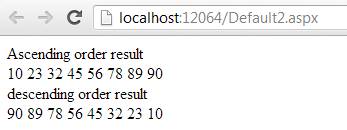
The output of the code is as follows:-


Figure 1

LINQ Hour 5 -1 Aggregate function in LINQ

Written By:-Isha Malhotra 
Our Website:-www.techaltum.com
Aggregate function using LINQ

We use many aggregate functions like sum, count, average, min, and max. In LINQ we can use this function in the following manner:-

SUM

If we want to perform sum aggregate function then we will implement the following queries:-

Sum with array

int[] marks = new int[] { 23, 45, 78, 90, 56, 89, 10, 32 };

        //simple sum without condition

        int res = marks.Sum();

        //sum with condition
        int res_with_where = marks.Where(cond => cond > 50).Sum();


        Response.Write("Sum without condition= " + res + "<br/>");

        Response.Write("Sum with condition="+ res_with_where+"<br/>");

Output of this code as follows:-


Figure 1

LINQ Hour 5 - Queries using LINQ

Written By:-Isha Malhotra 

Our Website:-www.techaltum.com
Perform different functionality (QUERY) using LINQ

As in the previous article I already discussed about select, insert, update and delete. I also discussed with where clause, order by, grouping. In this hour I will discuss about different operation which we can perform using LINQ. As we know we can perform this functionality on array, generics, database, xml etc. so here I am taking the example of array, generics and database. I will discuss xml separately.  

To work with this functionality I am taking the following source:-
Array

Using following int array:-

int[] marks = new int[] { 23, 45, 78, 90, 56, 89, 10, 32 };

Generics:-

Using following class to implement generics:-

public class data
{
    public int roll_no;
    public string student;
    public int per;

}

And following list:-

List<data> dt = new List<data>()
        {
            new data{roll_no=1, student="isha", per=100},
            new data{roll_no=2, student="neha", per=89},
            new data{roll_no=3, student="rahul", per=34}
        };
Database

Using following table:-


Figure 1

And create its class to mapping this table which is as follows:-

[Table(Name="prod_rep")]

public class Class1
{
   
    [Column]
    public int id;
    [Column]
    public int prod_year;
    [Column]
    public string dept;
    [Column]
    public int no_of_prod;
}

click on the following link to perform different functionality:-

Part 1 Aggregate function in LINQ

Part 2 Sorting in LINQ

Part 3 Take / TakeWhile and Skip / SkipWhile


Sunday, 19 May 2013

LINQ- Hour 3 (LINQ to XML)


LINQ to XML

When we interact with XML using LINQ then it is known as LINQ to XML.
To work with XML in LINQ you have to add a namespace
using System.Xml.Linq.

I am taking the following xml file for an example:-

<?xml version=”1.0” encoding=”utf-8” ?>

<Techaltum>

<student Code=”101”>
        <name>isha malhotra</name>
        <id> 1 </id>
        <course> asp.net </course>
    </student>

<student Code=”102”>
        <name>Avi malhotra</name>
        <id> 2 </id>
        <course> Web Designing </course>
    </student>

<student Code=”103”>
        <name>Neha</name>
        <id> 3 </id>
        <course> Java </course>
    </student>

</Techaltum>

If I consider this xml file then in this file first line is declaration. Techaltum is an element and in student element code is attribute.

First I will discuss how to declare all these in LINQ.

Syntax of Declaration in LINQ:-

XDeclaration dec = new XDeclaration("1.0", "utf-8", "yes");

Monday, 29 April 2013

LINQ-Hour 2 (LINQ to SQL)


Written By:-Isha Malhotra(malhotra.isha3388@gmail.com)
if you find this article useful then leave your comment

LINQ to SQL
SQL is a structured Query Language. When we need to interact with database using LINQ then we mapped our relational database to object oriented language using LINQ to SQL.
To interact with database we use Datacontext class which is in System.Data.LINQ. this class contains the constructor in which we have to pass the connection string.

Steps to work with LINQ to SQL

Step 1:-
Add LINQ to SQL Class by using Add New Item. It will add .dbml file which is database management language.


Figure 1

Step 2:-

Now add class by using Add New Item. These classes are used to mapped your database with object oriented. After adding the class, add the namespace System.Data.LINQ.Mapping. Then add [Table] tag to the class and [Column] to the variable which is as follows:-
using System;
using System.Collections.Generic;
using System.Linq;
using System.Web;
using System.Data.Linq.Mapping;


[Table(Name="prod_rep")]
public class Class1
{
    [Column]
    public int prod_year;
    [Column]
    public string dept;
    [Column]
    public int no_of_prod;

}

Prod_rep is table name in the database and others are columns.

Step 3:-

Now create the object of DataContext class and pass the connection string in the constructor. Now create the query for selecting the data from the table.
using System;
using System.Collections.Generic;
using System.Linq;
using System.Web;
using System.Web.UI;
using System.Web.UI.WebControls;
using System.Data.Linq;

public partial class _Default : System.Web.UI.Page
{
    protected void Page_Load(object sender, EventArgs e)
    {
        //create the object of data context class and pass the connection string
        DataContext dc = new DataContext("Data Source=ISHA-PC;Initial Catalog=TechAltum;Integrated Security=True");

        //create the query for selection
        var x = from data in dc.GetTable<Class1>()
                select new { Prod_year = data.prod_year, Dept = data.dept, No_of_Prod = data.no_of_prod };

        //bind the data in gridview
        GridView1.DataSource = x;
        GridView1.DataBind();
    }
}

Tuesday, 23 April 2013

LINQ Training - Hour 1

Written By:-Isha Malhotra(malhotra.isha3388@gmail.com)
if you find this article useful then leave your comment
LINQ-Hour 1

Language Integrated Query introduced in .net framework 3.5. LINQ integrated accessibility of data and query into language. LINQ makes easier to work with data.

Advantage of LINQ

Earlier when we connect to database, we used SQL queries as text like if we have to select any data from table then we write following queries:-

“select * from Table_name”

This query will be passed as text and if this query has some syntax error then it will be showed when this query will be executed means at runtime. But in LINQ at the time of compile time all syntax checked as it integrate query writing in our language(C# or Vb.net)

Query writing in LINQ

LINQ allows us to write query against all data whether it comes from array, database, XML etc.  This is the best feature of LINQ.

Before going deep into LINQ lets run some basic queries in LINQ using arrays and try to understand the syntax of LINQ